Pharmacy billing software has become essential for modern Indian medical shops. With GST compliance requirements, batch-level inventory tracking, expiry date management, and the need to compete with online pharmacies, the right billing solution can be the difference between a pharmacy that thrives and one that merely survives. This comprehensive guide covers everything you need to know about choosing and implementing billing software for your Indian pharmacy.
Why Pharmacy Billing Software Matters for Indian Chemists
Indian pharmacies face unique operational challenges that generic billing software cannot address. A typical chemist shop processes 50 to 200 customer transactions daily, receives 5 to 15 distributor invoices with varying formats, manages 3,000 to 8,000 SKUs across multiple batches, tracks expiry dates for regulatory compliance, and must generate GST-compliant invoices instantly. Manual billing systems or outdated software cannot scale to these demands.
The cost of poor billing management is substantial. Pharmacies without proper billing software lose 2 to 3 hours daily to manual data entry, miss expired stock until it becomes a write-off, struggle with accurate inventory counts, face compliance issues during drug inspector visits, and cannot quickly answer questions like "Which products generate the best margins?" or "How much inventory do I have in slow-moving categories?"
Modern pharmacy billing software directly impacts profitability by reducing operational time, minimizing inventory losses, enabling data-driven decisions, ensuring regulatory compliance, and improving customer service. The question is not whether to invest in billing software, but which solution best fits your pharmacy's needs and budget.
Understanding GST Compliance in Pharmacy Billing Software
GST is the most critical regulatory requirement for pharmacy billing in India. The Goods and Services Tax applies to medicines, with different tax slabs depending on the type and price point of the drug. Understanding how billing software handles GST is essential.
GST Slabs for Medicines in India
Medicines in India fall under different GST rates:
- 5% GST: Essential medicines listed under the 5% bracket, typically basic and widely-used drugs.
- 12% GST: Formulations like antibiotics, antivirals, and specialty medicines not covered by the 5% bracket.
- 18% GST: Non-prescription items, vitamins, supplements, and OTC products that are not registered drugs.
Most pharmacy billing software categorizes medicines by HSN (Harmonized System Nomenclature) code, which automatically applies the correct GST rate. The software should also distinguish between:
- CGST and SGST: For intra-state sales (split 50-50 between Central and State GST)
- IGST: For inter-state sales (applied as a single tax)
How Good Billing Software Handles GST
Premium pharmacy billing software automatically:
- Detects the medicine's HSN code and applies the correct tax slab
- Calculates CGST/SGST or IGST based on customer location
- Generates invoices with clear GST breakdowns for customer transparency
- Maintains records for GSTR-1 (outward supplies) filing
- Provides monthly GST reports for easy reconciliation
- Handles GST reconciliation when pharmacies need to file GSTR-3B
Without proper GST handling in your billing software, you face compliance penalties, incorrect tax payments, rejected GST filings, and potential audits by tax authorities. This alone justifies investing in GST-compliant pharmacy billing software.
Key Features Every Pharmacy Billing Software Must Have
Not all pharmacy billing software offers the same features. Here is what you should demand from any solution you consider:
Non-Negotiable Features
- GST-Compliant Invoicing: Generate bills with proper HSN codes, tax calculations, and compliant formatting. Invoices should be printable and digital.
- Batch-Level Inventory Tracking: Record each medicine down to batch number. This is a regulatory requirement under the Drugs and Cosmetics Act. If a recall happens, you must trace it to specific customers within minutes.
- Expiry Date Management: Automatic alerts when medicines approach expiry (30, 60, 90 days out). Ability to generate distributor return reports before stock expires. Many pharmacies lose 5-10% of margin to expired stock -- good software nearly eliminates this.
- Purchase Invoice Entry: Fast processing of distributor invoices. Whether manual or AI-assisted, this should not be a bottleneck. Many pharmacies spend 2-3 hours daily here.
- Basic Sales Reporting: Daily sales totals, payment mode breakdown (cash, card, UPI, credit), and outstanding dues from credit customers. This data should be available in real-time.
- Barcode Support: Generate and scan barcodes for faster billing and inventory updates. This eliminates typing errors during sales.
Important (But Not Immediately Critical) Features
- Margin Analysis: See which products generate the best margins. Identify slow-moving and fast-moving inventory. This helps with purchasing decisions and stock optimization.
- Mobile Access: Check inventory and process bills from a smartphone. For pharmacy owners who are constantly moving, mobile access is invaluable.
- Multi-User Support: If your staff handles different roles (billing, purchasing, management), each person needs separate logins with role-based permissions.
- Customer Credit Management: Track credit sales, outstanding dues, and payment history. Automated reminders for pending receivables.
- Return Management: Process medicine returns from customers and suppliers. Track returned stock separately.
Advanced (Future-Ready) Features
- AI-Powered Invoice Scanning: Photograph distributor invoices and the software automatically extracts medicine names, batch numbers, expiry dates, quantities, and prices using OCR technology. This reduces invoice entry time from 20-30 minutes to under 3 minutes.
- Automated Reorder Suggestions: Software analyzes your sales patterns and suggests what to reorder, when to reorder, and how much. This prevents stockouts and overstocking.
- Cloud Backup and Sync: Your data is backed up automatically and accessible from any device with internet. No more worrying about hardware failure.
Types of Pharmacy Billing Software Available in India
The pharmacy software market in India has three distinct categories, each suited to different pharmacy sizes and budgets:
Category 1: Basic Billing-Only Software
These are simple tools that generate GST-compliant invoices and maintain basic inventory counts. Many are standalone desktop applications that work offline and have been in use for 10-15 years. They are often sold through pharmacy trade channels with minimal marketing.
Best for: Very small pharmacies (1-2 staff) with low daily transaction volume who primarily need to print GST bills and nothing more.
Limitations: Minimal inventory intelligence. No expiry management. Manual entry for everything. No customer database. Single-user. Offline-only means no data synchronization. Often requires expensive hardware upgrades.
Category 2: Integrated Inventory + Billing Software
A step up from basic billing. These platforms handle purchase invoices (recording distributor shipments with batch and expiry data), sales billing, inventory tracking, and basic reporting. Many are desktop-based but increasingly moving to cloud.
Best for: Medium-sized pharmacies (2-5 staff) that want proper inventory control and are comfortable with manual invoice entry.
Limitations: Purchase entry is still manual and time-consuming. Reports are limited and hard to customize. Some lack robust expiry management. Phone and email support can be slow.
Category 3: AI-Powered Pharmacy Management Platforms
The newest and most advanced category. These platforms use artificial intelligence (OCR, machine learning) to automate the most time-consuming tasks. Instead of typing invoice data, you photograph the invoice and the software extracts everything. Instead of manually reviewing inventory, the software suggests reorders based on sales patterns.
Best for: Pharmacies of any size seeking to dramatically reduce operational time while improving accuracy. These are particularly valuable for busy pharmacies with multiple staff members.
Limitations: Requires stable internet. Technology is newer so ecosystem is smaller. Setup may take longer to customize. Some pharmacists need time to trust AI extraction.
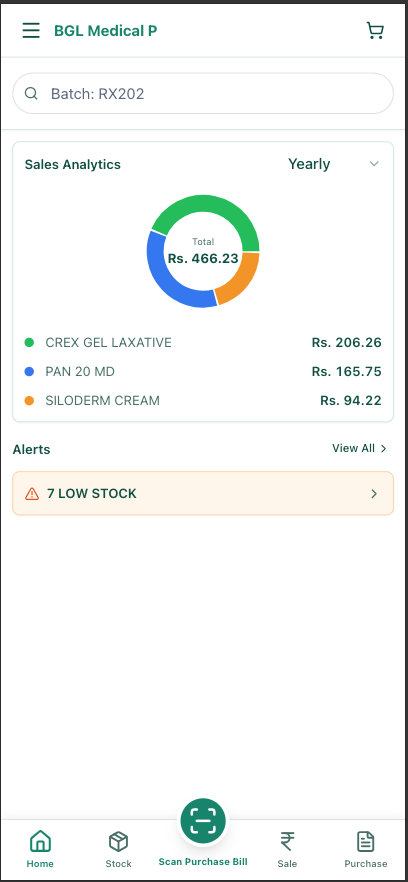
AI-powered pharmacy management like MedLens falls into this third category, combining OCR-based invoice scanning with full inventory management, batch tracking, expiry alerts, sales analytics, and mobile access.
Cost of Pharmacy Billing Software in India (2026)
Pharmacy software pricing varies significantly based on features and deployment model. Here is what you can expect:
Free Pharmacy Billing Software
Several free options exist in India, though they come with limitations:
- Basic desktop tools: Free standalone applications that generate GST invoices. No inventory management, no cloud backup, no mobile access. Good for very small shops as a stopgap, but limiting for any growth.
- Freemium models: Cloud-based platforms offering free tier up to a transaction limit (e.g., first 100 invoices per month free). After exceeding the limit, you pay monthly charges.
- Cost: Free tier typically supports shops with under 50 daily transactions. Beyond that, you upgrade to paid plans.
Budget Pharmacy Billing Software (Rs. 500-2,000/month)
Entry-level paid solutions in this price range typically include:
- GST-compliant invoicing
- Batch and expiry tracking
- Basic inventory reports
- Mobile-friendly interface
- Customer database
- Single or dual-user support
These are suitable for small pharmacies with 50-150 daily transactions. Limited reporting and analytics. Support may be email-based only.
Premium Pharmacy Billing Software (Rs. 2,000-10,000/month)
Mid-range solutions include all features from budget plans plus:
- Advanced reporting and analytics
- Multi-user with role-based access
- Margin analysis and profitability tracking
- Automated expiry alerts and return management
- Customer credit management
- Phone and email support
- Integration with some accounting software
Suitable for medium pharmacies (150-500 daily transactions). Better for decision-making and business growth.
Enterprise AI-Powered Solutions (Rs. 3,000-15,000+/month)
Advanced platforms with AI and automation:
- OCR-powered invoice scanning
- Automated reorder suggestions
- Advanced analytics and dashboards
- Unlimited users with granular permissions
- Integration with accounting, banking, and GSTR systems
- Dedicated support and training
- Cloud-based with automatic backups
Worth the investment for pharmacies processing 200+ daily transactions or managing multiple outlets.
Return on Investment (ROI)
A pharmacy currently spending 2-3 hours daily on manual invoice entry can save 15-20 hours weekly by switching to AI-powered software. At Rs. 5,000/month for premium software, this costs roughly Rs. 60 per hour saved. Most pharmacy staff costs Rs. 200-500 per hour, making the ROI clear within 2-3 months.
How to Set Up Billing Software in Your Pharmacy (Step-by-Step)
Implementing new pharmacy billing software requires planning. Here is a practical step-by-step guide:
Step 1: Assess Your Current Process
- Count how many invoices you receive daily (distributor invoices)
- Measure how much time goes to billing, data entry, and inventory management
- List the 20-30 medicines you stock most frequently
- Identify your biggest operational bottlenecks
Step 2: Define Your Requirements
- Budget (free, Rs. 500-2,000, or Rs. 2,000+?)
- User count (single user or multi-user?)
- Must-have features (batch tracking? Expiry alerts? Mobile access?)
- Integration needs (accounting software, bank, GSTR?)
- Support expectations (email, phone, in-person training?)
Step 3: Research and Trial
- Shortlist 3-5 solutions matching your requirements
- Request a free trial from each vendor
- Test with your own invoices, not demo data
- Check how the software handles India-specific requirements (GST, batch tracking, expiry management)
- Speak with existing customers if possible
Step 4: Plan Your Implementation
- Schedule the setup during a low-traffic period (early morning, late evening, or a slow day)
- Get staff involved in the trial phase so they are comfortable with the new tool
- Arrange training from the vendor (most good vendors provide this)
- Decide whether to migrate historical data or start fresh
- Establish a backup plan (what if the software fails on launch day?)
Step 5: Execute the Migration
- Create a test account and verify all features work as expected
- Import or manually enter your product master (medicine list with HSN codes, prices, batch info)
- Train your staff on the new system with hands-on examples
- Go live during a planned time with reduced transaction volume
- Monitor the first few days closely and have vendor support on standby
Step 6: Optimize and Scale
- After 1-2 weeks, review the data for any entry errors
- Adjust settings based on lessons learned
- Leverage the software's reporting features to identify trends and opportunities
- Gradually expand use of advanced features (analytics, margin tracking, reorder automation)
Common Mistakes Pharmacists Make When Choosing Billing Software
Learning from others' mistakes can save you months of frustration. Here are the most common errors when selecting pharmacy billing software:
Mistake 1: Choosing Based on Price Alone
The cheapest software is rarely the best value. A Rs. 500/month tool that wastes 20 hours monthly of your staff's time costs far more than Rs. 5,000/month software that saves those hours. Always calculate total cost of ownership, including the value of time saved and risks avoided (expired stock, compliance issues, lost sales).
Mistake 2: Not Testing with Your Own Data
Vendors' demo environments always look perfect. But real-world invoices are messy -- unclear printing, handwritten quantities, varying formats from different distributors. Always request a trial and test the software with actual invoices from your suppliers. If it struggles with your real data, that is your answer.
Mistake 3: Underestimating the Importance of Batch Tracking
"We don't think we need batch-level tracking" is something I hear often. Then a medicine gets recalled and the pharmacy cannot quickly identify which customers received the affected batch. Drug inspectors arrive and find missing batch records. Inventory audits reveal discrepancies because the software only tracks aggregate stock, not per-batch quantities. Batch tracking is not optional if you want regulatory compliance and operational control.
Mistake 4: Ignoring India-Specific Requirements
Generic pharmacy software designed for Western markets often fails with Indian invoices, HSN codes, GST requirements, and medical shop-specific workflows. The software may technically work, but you spend hours working around its limitations instead of leveraging its strengths. Always prioritize India-first solutions.
Mistake 5: Not Involving Staff in the Selection Process
Your billing counter staff will use the software 8 hours daily. If you pick something without getting their input and they find it cumbersome, adoption will be poor and you will not see the expected time savings. Involve your team in trials and listen to their feedback.
Mistake 6: Choosing Software Without Mobile Access
Many pharmacies still use desktop-only billing software. This means the pharmacy owner cannot check inventory or review sales when away from the shop. In 2026, mobile-first design is standard even in budget solutions. Do not settle for less.
Mistake 7: Neglecting Vendor Support Quality
The best software is useless if support is unavailable when you need it. Ask potential vendors: Do they offer phone support or only email? What are their response time guarantees? Do they provide on-site training? Read reviews specifically about their customer support. A vendor with good support can save you days of frustration.
Pharmacy Billing Software vs. Traditional GST Billing
Some pharmacy owners argue: "I can just use a simple tool to generate GST invoices. Do I really need software with inventory management?" Here is the comparison:
- Invoice Generation Only: Generates bills fast but you manually track inventory, expiry dates, and margins elsewhere (spreadsheets, notebook, memory). You have no data about which products are profitable or which are slow-moving. Compliance risks if you cannot trace medicines to batches.
- Full Billing + Inventory Software: Generates bills AND automatically tracks inventory, batch numbers, expiry dates, sales trends, and margins. You have real-time data for decision-making. Regulatory compliant. But requires proper data entry discipline.
- AI-Powered Pharmacy Software: Does everything above PLUS automates the manual data entry through invoice scanning. Your staff spends minutes per invoice instead of 20-30 minutes. Highest accuracy. Best for long-term business growth.
The investment in proper pharmacy billing software always outweighs staying with basic invoice generation alone.
Frequently Asked Questions About Pharmacy Billing Software
What is the best billing software for Indian pharmacies?
There is no single "best" solution -- it depends on your pharmacy's size, budget, and specific needs. For small shops (1-2 staff, 50 daily transactions), a free or budget tool with GST invoicing is sufficient. For medium pharmacies (3-5 staff, 100-300 daily transactions), integrated inventory + billing software is ideal. For busy pharmacies or chains (200+ daily transactions), AI-powered software saves significant time and reduces errors.
Is there free pharmacy billing software available?
Yes, several free and freemium options exist. Free tools typically include basic GST-compliant billing. Freemium models allow limited usage for free, then charge monthly fees for higher transaction volumes. Free options work for very small shops but lack advanced features like batch tracking, expiry alerts, and analytics. If your pharmacy is growing, you will likely outgrow free software within 6-12 months.
How does pharmacy billing software handle GST compliance?
Good pharmacy software stores the HSN code for each medicine, looks up the appropriate GST rate (5%, 12%, or 18%), calculates CGST/SGST or IGST automatically based on customer location, and generates invoices with clear tax breakdowns. Some software integrates with GSTR filing systems to simplify compliance. Without this, you risk incorrect tax calculations, failed GST filings, and audit penalties.
What features are most important in pharmacy billing software?
The most critical features are: (1) GST-compliant invoicing, (2) batch-level inventory tracking, (3) expiry date management with alerts, (4) fast purchase invoice entry, (5) basic sales reporting, and (6) barcode support. Advanced features like AI scanning, mobile access, and margin analysis are valuable but can be added later if budget is limited.
How long does it take to set up pharmacy billing software?
Initial setup typically takes 1-3 days depending on complexity. You need to enter your product master (medicine list with prices, HSN codes, etc.), configure user logins, and train staff. Some vendors assist with data migration from your old system. AI-powered software may require additional time for algorithm training on your specific invoices, but most vendors handle this.
Ready to Upgrade Your Pharmacy Billing?
Start with MedLens. Save 2+ hours daily on invoices. Free tier available. No credit card required.
MedLens is purpose-built for Indian pharmacies. Supports GST compliance, batch tracking per regulations, expiry management, OCR invoice scanning, and mobile-first access from any device. Save 10-15 hours weekly on manual data entry.