Running a medical shop in India in 2026 means managing complex inventory, staying compliant with regulations, and competing with online pharmacies -- all while keeping customers happy. The software you choose can either multiply your problems or solve them. This comprehensive guide walks you through the best medical shop software options available in India, what features truly matter, and how to pick the right solution for your business size and budget.
Why Medical Shops Need Software in 2026
The Indian medical shop landscape has transformed dramatically. Ten years ago, a successful chemist shop might manage 500-1000 products. Today, an average medical store stocks 3,000 to 8,000 SKUs. The pressure points have shifted. Manual registers no longer cut it. Customers expect quick billing. Tax authorities demand GST compliance. Drug inspectors check batch-level records. And distributors change terms and discounts weekly, making it impossible to track margins without digital systems.
The right medical shop software becomes your co-manager. It tracks which medicines are moving and which are dying on shelves. It alerts you when stock is approaching expiry. It calculates taxes automatically. It gives you reports that show which products are printing money and which are eating into margins. Without this visibility, you are flying blind.
Even more importantly, software frees up time. A typical medical shop owner spends 2-3 hours daily on invoice entry, stock counting, and bill preparation. That is time away from customers, from building relationships, from strategic thinking about your business. Software that handles this work -- especially AI-powered tools that scan invoices instead of requiring manual typing -- gives those hours back to you.
Core Features Every Medical Shop Software Must Have
Not all medical shop software is created equal. Some focus only on billing. Others track inventory but are clumsy at reporting. The best solutions balance ease of use with comprehensive features. Here is what actually matters for a chemist shop:
1. GST-Compliant Billing System
Every bill must be GST-compliant. This sounds simple but is not. Medicines fall under different tax brackets (5% for life-saving medicines, 12% for most generics, 18% for cosmetics). The split between CGST, SGST, and IGST depends on customer location and interstate transactions. A good medical shop software handles this automatically based on HSN codes and product categories. You should never calculate GST manually.
2. Batch-Level Inventory Tracking
The Drugs and Cosmetics Act requires you to maintain records that can trace any medicine back to its batch number. This is not optional. If a batch is recalled, you must identify every customer who purchased medicines from that batch. Your software must track inventory at the batch level, not just product level. This means recording batch number, expiry date, and quantity for every purchase.
3. Expiry Date Management with Alerts
Expired stock is money down the drain. A typical medical shop loses 2-5% of revenue annually to expired medicines if not properly managed. The software should alert you when stock is approaching expiry (at 30, 60, and 90 days) and generate reports for returning stock to distributors before the expiry deadline.
4. Purchase Invoice Entry and Processing
This is where most time is wasted. Recording a distributor invoice with 30 line items takes 20-30 minutes with traditional software. Each line requires typing the medicine name, quantity, batch number, expiry, MRP, rate, discount, and more. Modern AI-powered medical shop software can scan the invoice with a phone camera and extract all this data in 2-3 minutes.
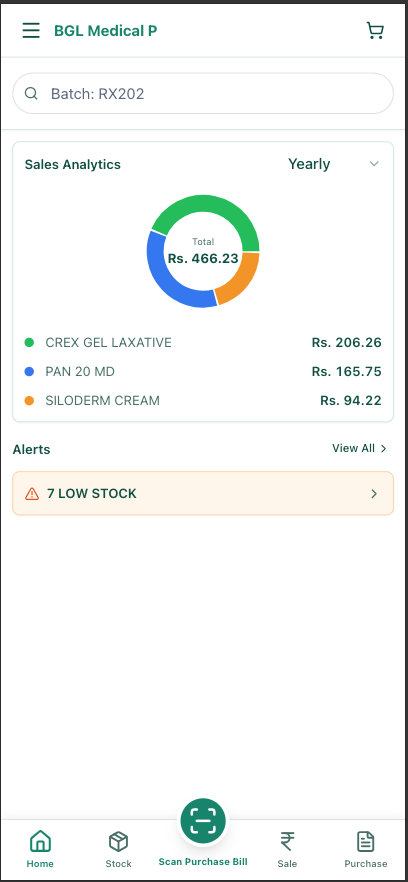
5. Sales Reporting and Analytics
You need to see daily sales trends, payment mode breakdown (cash vs. UPI), outstanding dues, and which products are generating the highest margins. Sales reporting transforms data into actionable insights. You should be able to answer questions like: What is my daily sales average? Which products have the best margins? How much credit is outstanding?
6. Mobile and Multi-User Access
Modern medical shop software should work on phones and tablets, not just desktops. This is not just convenience -- it is necessity. You might need to check stock levels from the counter or review sales reports from home. And if you have staff, each person needs a login with appropriate permissions.
Three Types of Medical Shop Software Solutions
The medical shop software market broadly falls into three categories. Understanding which type fits your needs is the first step in making the right choice.
Type 1: Traditional Billing-Only Software
These are older, desktop-based tools that focus primarily on generating bills and maintaining basic stock counts. They are often installed locally on a single computer and work offline. Examples include many pharmacy billing tools marketed in medical trade magazines and local software vendors.
Pros: Low cost (often free or Rs 1,000-2,000/year), offline functionality, minimal support requirements.
Cons: No real inventory management, single-user (locked to one computer), no backup, no mobile access, manual data entry for everything, limited reporting, no integration with modern GST systems.
Best for: Very small medical shops with fewer than 5 bills per day and minimal stock management needs.
Type 2: Cloud-Based Inventory + Billing Software
These are modern solutions that track both purchases and sales, handle batch numbers, expiry dates, and provide reports. They are cloud-based, meaning your data is automatically backed up and accessible from any device. Most run on a subscription model (Rs 3,000-15,000 per year).
Pros: Full inventory tracking, multi-user access, automatic backups, mobile-friendly, better reports, GST compliance, batch management.
Cons: Still requires manual entry of distributor invoices (which is time-consuming), ongoing subscription cost, requires internet connection, learning curve for staff.
Best for: Growing medical shops that want proper inventory control and are willing to invest time in manual data entry or do not have high invoice volumes.
Type 3: AI-Powered Medical Shop Software
The newest category. These platforms use artificial intelligence and optical character recognition (OCR) to automatically scan and extract data from distributor invoices. Instead of typing, you photograph the invoice. The AI reads all the details (medicine names, batches, expiry, rates, discounts) and populates your inventory automatically.
Pros: Eliminates 80-90% of manual data entry, higher accuracy than typing, full inventory and billing features, mobile-first design, automatic backups, instant insights into margins and trends.
Cons: Requires internet connection, newest technology so fewer vendors in the market, staff adaptation period (1-2 weeks to fully trust the AI), slightly higher cost (Rs 5,000-18,000/year).
Best for: Medical shops receiving more than 5 invoices per day that want to reclaim time from manual data entry. MedLens is an example of this category, specifically designed for Indian medical shops with support for Indian invoice formats, GST requirements, and mobile-first workflows.
Why AI-Powered Medical Shop Software is Transforming the Industry
The biggest time sink in pharmacy and medical shop management is purchase invoice entry. A typical medical shop receives 5-15 invoices daily. Each invoice has 10-50 line items. That is 50-750 data points to enter each day. At 5-10 seconds per line item (you have to type it, verify it, move to the next field), you are looking at 4-125 minutes of pure data entry daily. Over a month, that is 40-50 hours -- essentially a week of work.
AI-powered OCR (optical character recognition) changes this completely. Here is how it works:
Snap a Photo
Use your phone to photograph the distributor invoice. Works with any invoice format.
AI Extracts Everything
The software reads medicine names, quantities, batches, expiry dates, MRP, rates, discounts automatically.
Quick Review
You see the extracted data in an editable table. Fix any errors (rare) and confirm.
Done
Inventory is updated with batches, expiry dates, and stock levels. No typing required.
The time savings are dramatic. An invoice that takes 20-30 minutes with traditional software takes 2-3 minutes with AI-powered scanning. Over a month, that is 30-40 hours of your time back. The financial impact is significant -- if you value your time at Rs 300-500 per hour, that is Rs 10,000-20,000 monthly in reclaimed time.
Medical Shop Software Pricing in India: What You Should Pay
Medical shop software pricing varies by feature and vendor type. Here is a realistic breakdown to help you understand what you are getting at each price point:
| Category | Annual Cost | What's Included |
|---|---|---|
| Basic Billing | Rs 0 - Rs 2,000 | GST billing, basic stock count. Desktop only, no backup, limited support. |
| Inventory + Billing | Rs 3,000 - Rs 12,000 | Purchase/sale management, batch tracking, expiry alerts, reports. Manual data entry. |
| AI-Powered Scanning | Rs 5,000 - Rs 18,000 | OCR invoice scanning, automated inventory, analytics, mobile + web, cloud backup, AI-driven insights. |
| Enterprise/Chain | Rs 25,000+ | Multi-store management, centralized purchasing, chain analytics, API integrations, dedicated support. |
Breaking Down the True Cost
The cheapest option is not always the best value. Consider the true cost including your time:
- Free billing software: Rs 0/year in software cost, but you lose 10-15 hours monthly to data entry. At Rs 300/hour, that is Rs 3,000-4,500/month in opportunity cost.
- Manual inventory software: Rs 5,000-10,000/year in software, plus 5-8 hours monthly on data entry (Rs 1,500-2,400 opportunity cost). Total real cost: Rs 6,800-12,400/year.
- AI-powered software: Rs 10,000-15,000/year in software, plus 30-60 minutes monthly on invoice review (Rs 150-300 opportunity cost). Total real cost: Rs 10,200-15,600/year. But you gain 8-10 hours back each month.
The decision is not just about subscription cost. It is about total time cost and the value of reclaimed hours that you can spend on customer service, marketing, or growing your business.
Choosing the Right Medical Shop Software for Your Size
Different shops have different needs. The right software depends on your size, invoice volume, budget, and available capital for technology.
Small Medical Shops (Revenue Rs 3-5 lakh/month)
If you are just starting or running a very small shop, your priorities are simple: keep costs low and avoid complexity. A basic billing tool (even free) can handle your needs if you have fewer than 3-5 invoices per day. But as soon as you grow beyond that, invest in a proper inventory system. The cost is low (Rs 3,000-5,000/year) and the payoff is immediate -- you will know what you have in stock and catch expired medicines before they become losses.
Growing Medical Shops (Revenue Rs 5-20 lakh/month)
This is the sweet spot. You have enough invoice volume (8-15 invoices daily) that manual data entry is eating significant time. You have enough business to justify spending on software, but not so much that you need enterprise-level features. An AI-powered solution like MedLens makes sense here. You will save 30-40 hours monthly on data entry. You will have better visibility into margins. You will catch inventory issues faster. The Rs 10,000-15,000 annual investment will pay for itself in the first month through time savings alone.
Large Medical Shops or Chains (Revenue Rs 20+ lakh/month)
If you run multiple locations or have very high volume, you need multi-store management, centralized purchasing controls, and comprehensive analytics. Enterprise solutions cost more (Rs 25,000+/year) but they are necessary for operational control across multiple pharmacies.
How to Switch from Manual Records to Software
The prospect of switching from manual records to software seems daunting, but it is manageable if you approach it systematically.
Before the Switch
- Gather your current data. If you have been maintaining records manually, list your current stock. This takes a few hours but is important. You need starting balances in the new system.
- Clean up product names. Over time, the same medicine gets listed under different names (brand variations, different suppliers, typos). Use this opportunity to standardize your product catalog.
- Choose a quiet day. Plan the switchover for a day with low expected customer traffic -- a Sunday or a typically slow day. This gives you space to learn.
During the Transition
- Run parallel systems for 1-2 weeks. Continue using your old system for billing and keep the new system running alongside. Enter purchases in the new system but continue billing with the old one. This safety net makes learning much less stressful.
- Start with purchases, not billing. Purchases are where you will see the biggest benefit (especially with AI-powered tools). Get comfortable with how the system handles invoices first.
- Train all staff immediately. Do not wait for "later". Show every team member how to bill a customer, record a purchase, and check stock on day one. Invest a few hours in proper training -- it pays dividends.
After the Switch
- Verify inventory accuracy. After the first week, pick 20-30 high-volume products and compare the software count against physical shelf stock. Fix discrepancies early.
- Set up expiry alerts. Configure when you want to be notified about approaching expiry (30, 60, 90 days). This is one of the most valuable features.
- Review your data after 30 days. Look at sales trends, margin reports, and what your system is telling you about your business. You will likely see insights you never had with manual records.
Common Concerns During Migration
Will it slow down my shop? Yes, the first week will be slower. By week two, you will match your old speed. By week four, you will be significantly faster and with better data. Be patient.
What if the staff does not like the new system? Resistance is normal. But most staff adapt within 2-3 weeks once they see the system makes their work easier. Good training and support make all the difference.
What about the old data? Most modern software can import your old records. You can maintain historical data while using the new system going forward.
Comparing Medical Shop Software Options: Key Evaluation Criteria
When evaluating specific software products, use this checklist to compare:
- GST compliance: Does it automatically calculate CGST/SGST/IGST based on HSN codes? Can it generate GST invoices and maintain records for audits?
- Batch tracking: Can it track inventory at the batch level with expiry dates? Can you trace medicines back to batches for recalls?
- Mobile access: Does it have a real mobile app, or is it just a mobile-responsive website? Can you process transactions from your phone?
- Invoice scanning: If it offers OCR, how accurate is it? Can you see a free trial? Does it handle all distributor invoice formats?
- Reporting: Can you run custom reports? Can you see margin analysis, slow-moving stock, and trending data?
- Data security: Where is your data stored? Is it backed up? What is their privacy policy?
- Support: What support is available? Email only, or do they have phone support? Is there documentation and tutorials?
- Pricing transparency: What is included at each price tier? Are there hidden charges?
Statistics: What Medical Shops Gain After Switching
AI and the Future of Medical Shop Management
Artificial intelligence is not coming to medical shop management -- it is already here. Beyond invoice scanning, AI is being used to:
- Predict demand: Analyzing your historical sales patterns to suggest when and how much to reorder. This reduces both stockouts and excess inventory.
- Identify slow movers: Automatically flagging products that are not selling, so you can return them to distributors before they expire.
- Margin optimization: Showing you which products are actually profitable after all costs, helping you make informed decisions about what to stock.
- Customer insights: Tracking customer purchase patterns to identify high-value customers and understand buying trends.
- Compliance automation: Flagging Schedule H drugs that require prescriptions, maintaining required documentation, and tracking cold chain medicines that need special handling.
Modern AI-powered pharmacy and medical shop software is not just automating tedious tasks -- it is making medical shops smarter. The software becomes an extension of your judgment, flagging problems before they become expensive.
FAQ: Common Questions About Medical Shop Software
What is the best free medical shop software in India?
True free options with full functionality are rare. Tools like mPharma and some open-source solutions offer free tiers for basic billing, but lack robust inventory management, batch tracking, and batch-level expiry management -- which are critical for compliance. MedLens offers a free tier for small medical shops, but it includes full batch tracking, expiry management, and AI-powered invoice scanning, making it a better value than traditional free billing tools even with the small entry cost for growing shops.
Can I use regular accounting software instead of medical shop software?
No. Accounting software like Tally is good for financial reporting, but it cannot handle batch-level inventory tracking, expiry date management, or pharmaceutical-specific GST requirements. You need software designed specifically for medical shops. You can use both -- medical shop software for operations and accounting software for final financial reporting.
How secure is cloud-based medical shop software?
Cloud-based medical shop software is generally more secure than local installation. Your data is backed up automatically in multiple locations. You do not lose data if your computer crashes. Most reputable vendors use enterprise-grade encryption and security. However, always check their privacy policy, ask where servers are located (in India or abroad?), and verify they comply with local data protection regulations.
Can I integrate medical shop software with my existing accounting software?
Yes, most modern solutions offer integrations. Some have direct connectors for popular accounting software like Tally or QuickBooks. Others export data in formats you can import. Ask the vendor about integration options before committing.
How long does it take to learn new medical shop software?
Basic functionality can be learned in a few hours. Most staff become reasonably proficient within 1-2 weeks. Full feature mastery (understanding all reports, advanced settings) takes 4-6 weeks. Good documentation and training support significantly speed up this timeline.
Ready to Modernize Your Medical Shop?
MedLens combines AI-powered invoice scanning with complete inventory management designed for Indian medical shops. Start free today.
MedLens is built specifically for Indian medical shops and chemist stores. Supports batch-level inventory tracking, Indian GST compliance, expiry date management with regulatory compliance, and AI-powered invoice scanning with OCR technology.