Choosing the right pharmacy software can be the difference between a shop that runs smoothly and one that drowns in paperwork. With dozens of options available in India -- from free billing tools to AI-powered platforms -- how do you pick the one that actually fits your medical shop? This guide breaks down what matters, what to avoid, and how to evaluate your options without getting lost in marketing jargon.
Why Choosing the Right Software Matters
Most Indian pharmacies still run on outdated billing software that was designed in the early 2010s -- or worse, on manual registers and spreadsheets. These tools were adequate when a chemist shop stocked 500 products and dealt with a handful of distributors. The landscape today is different. A typical pharmacy now manages 3,000 to 8,000 SKUs, works with 15 to 30 distributors, handles GST compliance requirements, and competes with online pharmacies offering next-day delivery.
The software you choose directly affects three things: how much time your staff spends on data entry instead of serving customers, how accurately you track inventory and expiry, and how clearly you can see the financial health of your business. Get it wrong, and you are paying for a tool that creates more work than it eliminates. Get it right, and you free up hours each day while catching problems -- expired stock, slow-moving inventory, thin margins -- before they cost you money.
This is not a ranked listicle. Every pharmacy has different needs depending on size, volume, and budget. Instead, this guide gives you a framework to evaluate any pharmacy software and make a decision that fits your shop.
What to Look for in Pharmacy Software
Before comparing products, you need to know which features actually matter for daily operations. Here is a practical checklist, ordered by how much impact each feature has on a typical Indian chemist shop:
Non-Negotiable Features
- Invoice and billing management -- Generate GST-compliant sale bills with proper HSN codes. Calculate CGST, SGST, and IGST automatically. Handle returns and credit notes.
- Inventory tracking with batch numbers -- Every medicine strip has a batch number. Your software must track inventory at the batch level, not just product level. This is a regulatory requirement under the Drugs and Cosmetics Act.
- Expiry date management -- Automatic alerts for medicines approaching expiry (30, 60, 90 days out). The ability to generate reports for distributor returns before stock expires.
- Purchase entry -- Recording distributor invoices quickly and accurately. This is where most pharmacies spend the bulk of their software time.
- Basic sales reporting -- Daily sales totals, payment mode breakdown (cash, UPI, credit), and outstanding dues from credit customers.
Important but Not Urgent
- Sales analytics and margin tracking -- Understanding which products generate the best margins, identifying slow-moving stock, and tracking trends over time.
- Mobile access -- Checking stock levels, viewing sales data, or processing bills from a phone rather than being tied to a desktop.
- Multi-user support -- If you have staff handling billing while you manage purchases, each person needs their own login with appropriate permissions.
- Customer database -- Tracking regular customers, their purchase history, and outstanding credit balances.
Forward-Looking Features
- AI-powered data entry -- Using OCR (optical character recognition) to scan invoices with a phone camera instead of typing every line item manually.
- Automated reorder suggestions -- Software that analyzes your sales patterns and suggests when to reorder, and how much.
- Cloud-based access -- Accessing your data from anywhere, with automatic backups, instead of worrying about hard drive failures.
Types of Pharmacy Software Available in India
The market broadly falls into three categories. Understanding which category a product belongs to helps you set the right expectations.
Category 1: Billing-Only Software
These tools focus primarily on generating sale bills and maintaining basic stock counts. They are often desktop-based, work offline, and have been around for decades. Examples include many of the locally installed pharmacy billing tools you find marketed in chemist trade magazines.
Best for: Very small shops with low transaction volume that primarily need to print GST bills.
Limitations: Minimal inventory intelligence. No expiry alerts beyond basic reports. Manual data entry for everything. Often locked to a single computer with no backup strategy.
Category 2: Inventory + Billing Software
A step up from billing-only. These products handle both the purchase side (recording distributor invoices, tracking batches) and the sale side (billing, returns). Many offer expiry management, basic reports, and sometimes GST filing integration.
Best for: Medium-sized pharmacies that want proper inventory control but are comfortable with manual data entry.
Limitations: Purchase entry is still manual -- you type every line item from every invoice. This is where the real time sink is. Reports are often rigid and hard to customize.
Category 3: AI-Powered Pharmacy Management
The newest category. These platforms use artificial intelligence -- typically OCR and machine learning -- to automate the most time-consuming parts of pharmacy management. Instead of typing invoice data, you photograph the invoice and the software extracts medicine names, quantities, batch numbers, MRP, and expiry dates automatically.
Best for: Pharmacies of any size that want to dramatically reduce data entry time while improving accuracy.
Limitations: Requires a stable internet connection. The technology is newer, so the product ecosystem is smaller. Some pharmacists need a few days to trust the AI extraction before they stop double-checking every field.
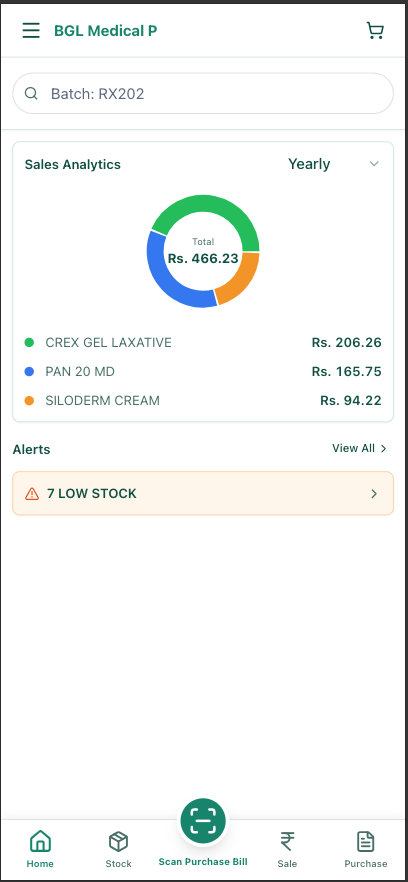
MedLens falls into this third category. It combines OCR-based invoice scanning with full inventory management, batch tracking, expiry alerts, and sales analytics -- all accessible from both web and mobile.
Must-Have Features for Indian Medical Shops
India has specific requirements that generic pharmacy software from other markets simply does not address. When evaluating any product, check for these India-specific capabilities:
GST Compliance That Actually Works
Every pharmacy bill must include GST breakdowns. But GST for pharmaceuticals is not simple -- medicines fall under different tax slabs (5%, 12%, 18%), and the split between CGST/SGST and IGST depends on whether the sale is intra-state or inter-state. Your software should handle this automatically based on the product's HSN code and customer location, not require you to calculate it manually.
Indian Invoice Format Support
Distributor invoices in India follow formats that are different from what you see in Western countries. They include fields like PTR (price to retailer), PTS (price to stockist), scheme quantities, and complex discount structures (trade discount + cash discount + scheme). Your software needs to understand these fields, not force you to work around them.
Batch Tracking per Drug Regulations
The Drugs and Cosmetics Act requires pharmacies to maintain records that can trace any sold medicine back to its batch. This means your software must link every sale transaction to a specific batch number. If a drug recall happens, you should be able to identify which customers received the affected batch within minutes. Software that only tracks aggregate stock without batch-level detail puts you at regulatory risk.
Schedule H and H1 Drug Controls
Certain drugs require prescription records. Your software should flag Schedule H and H1 drugs during billing and maintain the required documentation. This is not just good practice -- it is a legal requirement that drug inspectors check during visits.
Mobile-First Design
Many Indian pharmacy owners are more comfortable with smartphones than desktops. Software that works well on mobile -- not just a shrunken desktop interface, but a genuinely mobile-optimized experience -- makes adoption much easier. It also means you can check stock levels, review sales, or even process a return from your phone when you are away from the shop.
How AI-Powered Software is Different
The single biggest time drain in pharmacy management is recording purchase invoices. A typical pharmacy receives 5 to 15 invoices daily, each containing 10 to 50 line items. That translates to 50 to 750 individual line items per day, each requiring you to type a medicine name, quantity, free quantity, batch number, expiry date, MRP, rate, discount, and GST percentage.
With traditional software, entering a single invoice with 30 line items takes 20 to 30 minutes if you are fast. With AI-powered OCR, the same invoice can be processed in under 3 minutes. Here is what the workflow looks like:
Photograph the Invoice
Open the app on your phone and take a picture of the distributor invoice. Works with printed invoices of all formats.
AI Extracts the Data
The software reads every line item -- medicine name, batch, expiry, MRP, quantity, discount, GST -- and structures it automatically.
Review and Correct
You see the extracted data in an editable table. Fix any errors (rare with good OCR) and confirm.
Inventory Updated
Stock levels, batch numbers, and expiry dates are all recorded. No typing required.
The difference is not incremental -- it is transformational. A pharmacy that previously spent 2 to 3 hours daily on invoice entry can realistically reduce that to 15 to 20 minutes. That is not a marginal improvement. It fundamentally changes how much time the pharmacist has for customer service, business planning, and rest.
Accuracy Matters More Than Speed
Speed is the obvious benefit, but accuracy may matter even more. Manual data entry introduces errors at a rate of roughly 1 to 3 percent. That sounds small until you calculate the impact: with 500 line items per week, you are looking at 5 to 15 errors. A wrong batch number, a mistyped expiry date, or an incorrect MRP can each cause real problems -- from compliance issues during inspections to financial losses from untracked expired stock.
AI-powered extraction, once reviewed, typically achieves accuracy above 95 percent on the initial scan, and the review step catches the remaining discrepancies. The net result is fewer errors than manual entry, not more.
Cost Comparison: What Should You Expect to Pay?
Pharmacy software pricing in India varies wildly. Here is a realistic breakdown of what different categories cost:
| Category | Typical Cost | What You Get |
|---|---|---|
| Free / Basic Billing | Rs 0 - Rs 2,000/year | GST billing, basic stock count. Usually desktop-only. Limited or no support. |
| Inventory + Billing | Rs 3,000 - Rs 12,000/year | Full purchase/sale management, batch tracking, expiry alerts, basic reports. Manual data entry. |
| AI-Powered | Rs 5,000 - Rs 18,000/year | OCR invoice scanning, automated inventory, analytics, mobile + web, cloud backup. |
| Enterprise / Chain | Rs 25,000+/year | Multi-store management, centralized purchasing, chain-level analytics, API integrations. |
What Small Shops Need vs. Large Chains
Single-store pharmacy (monthly revenue under Rs 5 lakh): You do not need enterprise features. Focus on software that handles billing, basic inventory, and expiry tracking reliably. If your invoice volume is low (fewer than 5 invoices per day), even manual entry is manageable. But if you process more than that, the time savings from AI-powered entry will pay for the software cost within the first month.
Growing pharmacy (revenue Rs 5-20 lakh/month): This is the sweet spot for AI-powered software. Your invoice volume is high enough that manual entry is a genuine bottleneck, and you need analytics to identify which products and distributors are giving you the best margins. Mobile access becomes important because you likely manage the business on the move.
Multi-store chains: You need centralized inventory visibility, staff access controls across locations, consolidated reporting, and potentially integration with accounting software. Enterprise pricing is justified here because the operational complexity is significantly higher.
The Hidden Cost of "Free" Software
Free pharmacy software exists, but consider what you are trading. Most free tools are desktop-only with no cloud backup -- one hard drive failure and you lose years of data. They rarely receive updates for new GST rules or regulatory changes. Support is minimal or non-existent. And the time you spend on manual data entry has a real cost: if you value your time at even Rs 200 per hour, spending 2 extra hours daily on data entry costs you Rs 12,000 per month -- far more than any software subscription.
Making the Switch: Migration Tips
Switching pharmacy software feels daunting, but it does not have to be. Here is a practical approach that minimizes disruption to your daily operations:
Before You Switch
- Export your current data. Most pharmacy software can export product lists, customer databases, and transaction history as CSV or Excel files. Do this before cancelling your old software.
- Clean up your product master. Migration is a good opportunity to remove discontinued products, fix spelling variations (the same medicine listed under three different names), and standardize your data.
- Pick a low-volume day. Start the transition on a Sunday or a day when you expect fewer customers. This gives you breathing room to learn the new system.
During the Transition
- Run both systems in parallel for one week. Enter purchases in the new software but keep the old one running for billing. This gives you a safety net while you build confidence.
- Start with purchase entry. This is where you will see the biggest benefit from new software (especially AI-powered options). Get comfortable with how the new system handles invoices before switching billing.
- Train your staff on day one. Do not wait. Show every person who touches the software how the key workflows work -- billing a customer, recording a purchase, checking stock.
After the Switch
- Verify stock counts. After the first week, do a spot check of 20 to 30 high-volume products. Compare the software's stock count against physical shelf counts. Fix any discrepancies early.
- Set up expiry alerts. Configure the alert thresholds (30, 60, 90 days) that match your return policies with distributors. This is one of the highest-value features you will use.
- Review your first month's reports. After 30 days, look at the sales analytics and margin reports. You will likely discover insights about your business that were invisible with your old system.
What to Expect in the First Month
Be realistic: the first week will be slower than your old system because you are learning new workflows. By the second week, you should be at the same speed. By the end of the first month, you will be significantly faster -- and you will have better data than you have ever had.
The most common mistake pharmacists make is expecting perfection from day one and then reverting to the old system out of frustration. Give yourself 30 days. If the software is genuinely good, the improvement will be obvious well before that deadline.
What Pharmacies Report After Switching
Bottom Line
There is no single "best" pharmacy software for every chemist in India. The right choice depends on your shop's size, volume, budget, and how much you value your time. But the direction the industry is moving is clear: manual data entry is being replaced by intelligent automation, desktop-only systems are giving way to cloud and mobile, and pharmacies that adopt better tools are serving customers faster while making fewer costly mistakes.
If you are still typing every invoice line by hand, consider how much time and money that process costs you each month. Then ask whether that cost is more or less than a software upgrade. For most pharmacies, the math is not even close.
Take the time to evaluate your options properly. Request a trial from any software you are considering. Test it with your actual invoices, not just a demo. And pay attention to how the product handles the India-specific requirements outlined above -- that is where most generic solutions fall short.
See How MedLens Works for Your Pharmacy
Free tier available for small pharmacies. No credit card required. Set up in 10 minutes.
MedLens is built specifically for Indian pharmacies, with support for Indian invoice formats, GST compliance, batch tracking per drug regulations, and mobile-first access from any device.